自开发数据选择通用组件
介绍
1. 一个类似于数据选择组件的模拟组件
2. 支持接口配置(返回json有所要求)
3. 支持主、子表单搜索条件带入
4. 支持选中结果带出主、子表单
5. 支持前、后端分页
6. 支持表格内简单编辑
7. 支持简单的插槽
预览效果
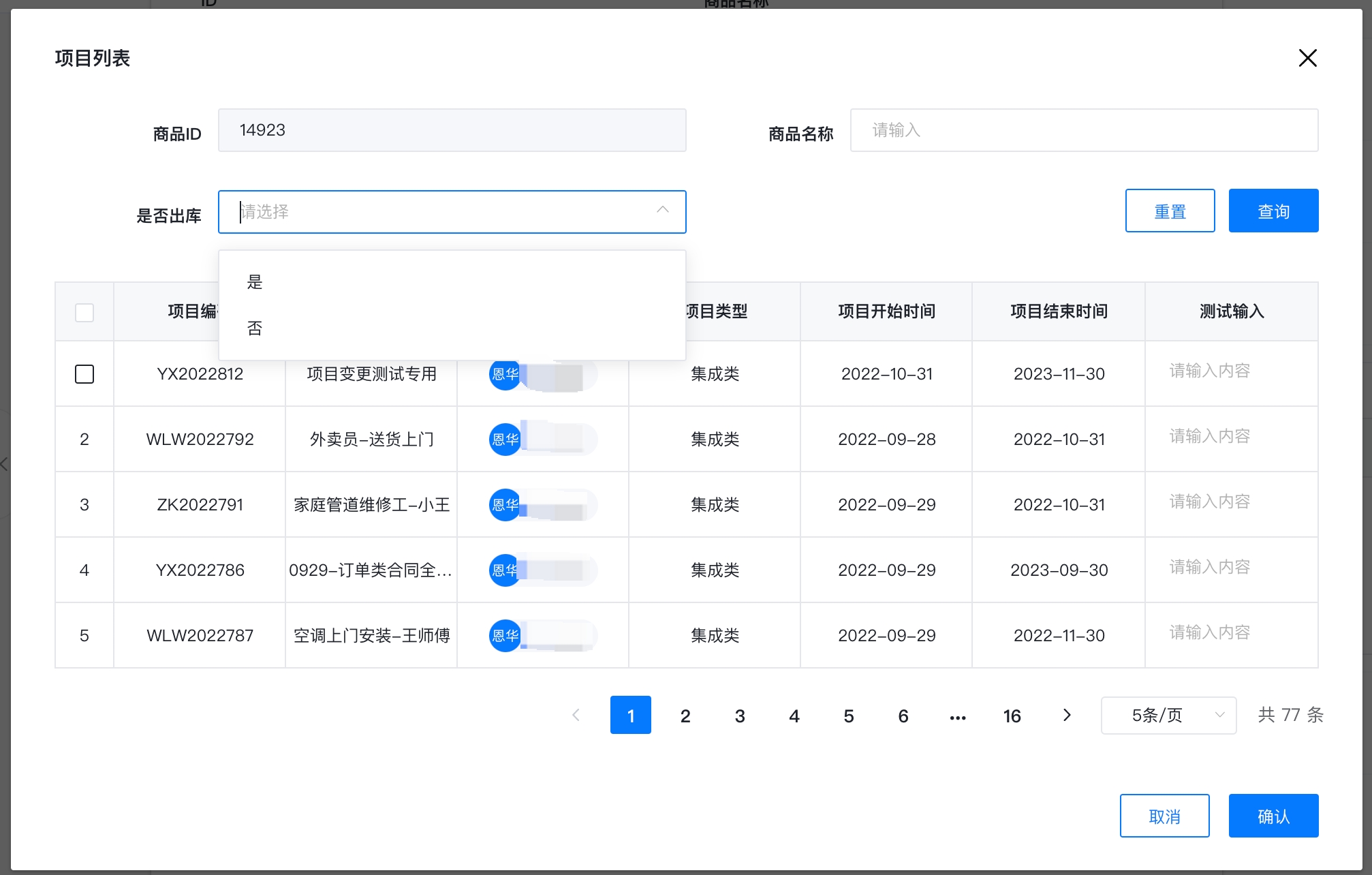
基本配置
总体配置
该配置会被放入自开发组件的标题说明中
{
    "seqType": "checkbox",
    "mode": "main | son",
    "title": "商品1",
    "width": "",
    "includeEdit": true,
    "api": {
        "url": "https://www.fastmock.site/mock/da0602cc6250419cf12afcd90b70751e/menu/api/menu",
        "method": "get",
        "disableSuccessMsg": true
    },
    "params": [
        {
            "filed": "name",
            "type": "value",
            "value": "【字段名称】"
        },
        {
            "componentType": "FORM_TEXT_INPUT",
            "sonTable": false,
            "filed": "type",
            "type": "model",
            "value": ""
        }
    ],
    "searchList": [
        {
            "component": "SearchInput",
            "label": "商品ID",
            "disable": true,
            "searchKey": "id",
            "searchValue": "",
            "extraConfig": {}
        },
        {
            "component": "SearchInput",
            "label": "商品名称",
            "disable": true,
            "searchKey": "name",
            "searchValue": "",
            "extraConfig": {}
        },
        {
            "component": "SearchSelect",
            "label": "是否出库",
            "disable": false,
            "searchKey": "chu",
            "searchValue": "",
            "extraConfig": {
                "multiple": false,
                "api": {
                    "url": "https://www.fastmock.site/mock/da0602cc6250419cf12afcd90b70751e/menu/api/menu",
                    "method": "get",
                    "disableSuccessMsg": true,
                    "params": {}
                },
                "selectOptions": [
                    {
                        "id": "111",
                        "label": "是"
                    },
                    {
                        "id": "222",
                        "label": "否"
                    }
                ]
            }
        }
    ],
    "headerConfig": [
        {
            "type": "FORM_TEXT_INPUT",
            "align": "center",
            "visible": true,
            "attribute": {},
            "label": "供应商银行户主名",
            "prop": "supplierName",
            "readOnly": false,
            "required": false
        }
    ],
    "paginationType": "front-end | back-end",
    "output(1)": {
        "mode": "push",
        "sonTable": {
            "tableModelCode": ""
        },
        "config": [
            {
                "type": "FORM_TEXT_INPUT",
                "prop": "supplierName",
                "model": "",
                "child": {
                    "prop": ""
                }
            }
        ]
    },
    "output(2)": {
        "mode": "full",
        "sonTable": {
            "tableModelCode": ""
        },
        "config": [
            {
                "type": "FORM_TEXT_INPUT",
                "prop": "supplierName",
                "model": "",
                "child": {
                    "prop": ""
                }
            }
        ]
    },
    "output(3)": {
        "mode": "part",
        "config": [
            {
                "type": "FORM_TEXT_INPUT",
                "prop": "supplierName",
                "to": "main",
                "model": "",
                "child": {
                    "prop": ""
                }
            },
            {
                "type": "FORM_TEXT_INPUT",
                "prop": "supplierName",
                "to": "son",
                "tableModelCode": "",
                "model": "",
                "child": {
                    "prop": ""
                },
                "config": [
                    {
                        "type": "FORM_TEXT_INPUT",
                        "prop": "supplierName",
                        "model": "",
                        "child": {
                            "prop": ""
                        }
                    }
                ]
            }
        ]
    },
    "output(4)": {
        "mode": "assign",
        "config": [
            {
                "type": "FORM_TEXT_INPUT",
                "prop": "supplierName",
                "model": "",
                "child": {
                    "prop": ""
                }
            },
            {
                "type": "FORM_TEXT_INPUT",
                "prop": "supplierName",
                "model": "",
                "child": {
                    "prop": ""
                }
            }
        ]
    }
}
1、seqType
显示的表格类型,可选值radio, checkbox, seq, none,类型为字符串
| seqType | 含义 |
|---|---|
| radio | 单选 |
| checkbox | 多选 |
| seq | 序号 |
| none | 无 |
该组件可以用在子表或主表中,如果在子表中,seqType 必须是 radio,如果是主表上,seqType 可以是 checkbox 和 radio。
对于其他两种类型 seq、none 暂无用处,或者你需要展示其他东西的时候会有用处
2、 mode
模式,表示该组件用在哪里?可选值 main、son,类型为字符串
| mode | 含义 |
|---|---|
| main | 主表 |
| son | 子表 |
3、title
标题,控制弹出 modal 的标题,遵循 x-modal 的配置
4、width
宽度,控制弹出 modal 的宽度,遵循 x-modal 的配置
| width | 含义 |
|---|---|
| small | 小 |
| middle | 中 |
| large | 大 |
| 1200 | 随意正数 |
5、includeEdit
表格是否有编辑的字段,
includeEdit 为 true 时,表格取消移入高亮和单击行默认选中,为 false 时,移入高亮且单击行默认选中
includeEdit 不会判断你后续的列是否有编辑的列,如果你写了是,默认取消移入高亮和单击行默认选中,即使你没有编辑的列。当然你也可以通过它来取消单击行默认选中的功能
6、api
api,表格加载数据的接口,自定义接口地址和请求方式,由 this.$request 发送该请求,数据类型如下:
interface Api {
    url: string;
    method: "get" | "post" | "...";
    disableSuccessMsg: boolean;
}
对于返回类型,基本遵循倚天的 com.definesys.mpaas.common.http.Response 类型,当然你可以不遵循这个规范,但下面的必须属性必须遵循,可选属性可忽略
interface Response<T> {
    code: "ok" || '200';
    message?: string;
    total: number;
    data?: T[];
    table: T[];
    requestid?: string;
}
7、params
params,需要带入到搜索条件的参数,它会被用到上述 api 的请求参数中,数据类型如下:
interface Param {
    componentType?: "FORM_TEXT_INPUT" | "FORM_NUMBER_INPUT" | "...";
    sonTable?: boolean;
    filed: string;
    type: "model" | "value";
    value: string;
}

type Params = Array<Param>;
componentType,目前只适配了 FORM_TEXT_INPUT,其他的 TODO,表示这个参数需要从哪种类型的组件中取值
sonTable,表示是否是从子表中取的值,如果该组件用在主表,即 mode = main,sonTable 一定是 false,如果你写 true 也会被忽略掉(当然它也不会带入到搜索条件中),如果在组件用在子表,即 mode = son,这个参数不做限制,你可以取主表里面的值带入,也可以取子表里面的值带入
filed 字段标识,和下方的 searchList 中的 searchKey 一一对应
type 文字类型,model 表示模型字段,根据模型字段来获取带入的值,value 表示固定值,可以是固定值,当然也可以使用平台的表单字段(组件配置中的标题说明,可以带入表单字段,公示规则和链接,这些值都是可以的) 推荐统一使用model
value,如果 type 是 model 那么就是模型编码(带表名(modelField)),如果是 value,填入固定值即可
8、searchList
searchList,api 发送请求时携带的参数,如果和 params 里携带的值对应上了(对应关系是 field === searchKey),就会被带入进去,数据类型如下:
interface ExtraConfig {
    [index: string]: any;
}

interface SearchList {
    component: "SearchInput" | "SearchSelect",
    label: string,
    disable: boolean,
    searchKey: string,
    searchValue: string,
    extraConfig: ExtraConfig
}
componet目前适配了 单行输入(SearchInput)和下拉框 (SearchSelect),对于下拉框,searchKey和field必须对应(可以不带入值),因为需要这个对应关系根据model找到它的label是搜索条件展示的说明文字disable是该搜索条件是否是禁填的,对于带入的值还是会带入,禁止之后,即使点击重置按钮,依然不会清空searchKey是和field对应的,当然可以不需要对应,可以是用户自己填写的searchValue如果不是带入的,可以规定默认值,如果是带入的还是指定了该值则该值无效extraConfig额外的配置,目前只有组件是下拉框时需要指定,当然也可以不指定(下面以下拉框配置解释)multiple是否多选,如果对应了field那么会根据带入的组件的多选还是单选决定,人为指定无效api如果和field不对应,可以使用api动态获取,当然这一点暂时没做 (TODO项)selectOptions如果对应了field那么会根据带入的组件的选项,人为指定无效
"extraConfig": {
    "multiple": false,
    "api": {
        "url": "https://www.fastmock.site/mock/da0602cc6250419cf12afcd90b70751e/menu/api/menu",
        "method": "get",
        "disableSuccessMsg": true,
        "params": {}
    },
    "selectOptions": [
        {
            "id": "111",
            "label": "是"
        },
        {
            "id": "222",
            "label": "否"
        }
    ]
}
9、headerConfig
headerConfig 表格的列表字段配置,数据类型如下:
type Attribute = {
    [index: string]: any;
}

interface HeaderConfigItem {
    type: "FORM_TEXT_INPUT" | "...";
    align?: "center" | "left" | "right";
    visible: boolean;
    attribute?: Attribute;
    label: string;
    prop: string;
    showOverflowTooltip?: true;
    customSlot?: string;
    slotTemplate?: string;
    readOnly?: boolean;
    required?: boolean;
}

type HeaderConfig = HeaderConfigItem[]
type组件类型,暂时只做了FORM_TEXT_INPUT,后续将新增其他类型(🐦)align字段的位置,可选visible字段是否可见attribute其他属性,还没想好怎么用,预留,可选label表头说明文字prop接口返回的字段对应的属性名showOverflowTooltip是否在字数过多时显示...customSlot自定义插槽名,可选slotTemplate插槽模版,可选readOnly是否只读,暂时无用,可选required是否必填,暂时无用,可选
10、paginationType
paginationType,前端分页还是后端分页
type PaginationType = "front-end" | "back-end"
11、output
interface Child {
    prop: string;
    child?: Child;
}
interface ConfigItem {
    type: "FORM_TEXT_INPUT" | "...";
    prop: string;
    to?: "main" | "son";
    model: string;
    child?: Child;
    config?: ConfigItem[];
}

interface Output {
    mode: "push" || "full" || "part" || "assign";
    sonTable?: {
        tableModelCode: string;
    },
    config: ConfigItem[]
}
关于带出的描述 mode 属性
默认带出的模式是下面这样设计的
如果是多选,那么带出的模式只能是带出到子表中去(mode是push、full),如果是单选:组件在主表上使用的话,某些属性可以带入到子表(这个属性必须是数组形式的)和主表上(mode是part),或者全部代入到主表中去(mode是assign),如果组件是在子表中使用,那么只能带入到子表的属性上去,不可代入到主表上去(mode是assign)
mode,模式,带出的模式push,增量带出,不会影响到之前的子表数据full,全量带出,影响之前的子表数据,会被覆盖part,部分带出,设计是不影响子表数据,一部分带入主表,一部分带入子表(还没做,🐦了)assign,仅赋值,被带入主表中或子表中
sonTabletableModelCode,如果需要带入到子表中,提供子表的表名(数据模型的子表编码值)
configtype,带出的组件类型,目前只是"FORM_TEXT_INPUT"prop,对应数据的propto,带出到子表还是主表model,带出到哪个字段的模型编码(modelField)child- 属性可能是对象,要带出的是它里面的属性
prop,属性字段名child同理
config,如果是部分赋值,那么需要提供它下面的属性和子表的对应关系(同样,🐦了)
自定义简单插槽
举个🌰(完整配置)
{
    "seqType": "checkbox",
    "mode": "main",
    "title": "项目列表",
    "width": "",
    "includeEdit": true,
    "api": {
        "url": "http://172.19.11.93:30614/project/all",
        "method": "get",
        "disableSuccessMsg": true
    },
    "params": [
        {
            "filed": "id",
            "type": "value",
            "value": "14923"
        },
        {
            "componentType": "FORM_TEXT_INPUT",
            "sonTable": false,
            "filed": "name",
            "type": "model",
            "value": "production.pname"
        },
        {
            "componentType": "FORM_SELECT_INPUT",
            "sonTable": false,
            "filed": "chu",
            "type": "model",
            "value": "production.chu"
        }
    ],
    "searchList": [
        {
            "component": "SearchInput",
            "label": "商品ID",
            "disable": true,
            "searchKey": "id",
            "searchValue": "",
            "extraConfig": {}
        },
        {
            "component": "SearchInput",
            "label": "商品名称",
            "disable": false,
            "searchKey": "name",
            "searchValue": "",
            "extraConfig": {}
        },
        {
            "component": "SearchSelect",
            "label": "是否出库",
            "disable": false,
            "searchKey": "chu",
            "searchValue": "",
            "extraConfig": {
                "multiple": false,
                "selectOptions": []
            }
        }
    ],
    "headerConfig": [
        {
            "type": "FORM_TEXT_INPUT",
            "align": "center",
            "visible": true,
            "editable": false,
            "label": "项目编码",
            "prop": "projectCode",
            "readOnly": false,
            "required": false,
            "showOverflowTooltip": true
        },
        {
            "type": "FORM_TEXT_INPUT",
            "align": "center",
            "visible": true,
            "editable": false,
            "label": "项目名称",
            "prop": "projectName",
            "readOnly": false,
            "required": false,
            "showOverflowTooltip": true
        },
        {
            "type": "FORM_TEXT_INPUT",
            "align": "center",
            "visible": true,
            "editable": false,
            "label": "责任人",
            "prop": "responsiblePerson",
            "readOnly": false,
            "required": false,
            "showOverflowTooltip": true,
            "customSlot": "person",
            "slotTemplate": "<x-person-tag :personName={row.responsiblePerson.username} :avatarUrl={row.responsiblePerson.avatarUrl}></x-person-tag>"
        },
        {
            "type": "FORM_TEXT_INPUT",
            "align": "center",
            "visible": true,
            "editable": false,
            "label": "项目类型",
            "prop": "projectType",
            "readOnly": false,
            "required": false,
            "showOverflowTooltip": true
        },
        {
            "type": "FORM_TEXT_INPUT",
            "align": "center",
            "visible": true,
            "editable": false,
            "label": "项目开始时间",
            "prop": "projectStartTime",
            "readOnly": false,
            "required": false,
            "showOverflowTooltip": true
        },
        {
            "type": "FORM_TEXT_INPUT",
            "align": "center",
            "visible": true,
            "editable": false,
            "label": "项目结束时间",
            "prop": "projectEndTime",
            "readOnly": false,
            "required": false,
            "showOverflowTooltip": true
        },
        {
            "type": "FORM_TEXT_INPUT",
            "align": "center",
            "visible": true,
            "editable": false,
            "label": "测试输入",
            "prop": "finput",
            "readOnly": false,
            "required": false,
            "customSlot": "finput1",
            "slotTemplate": "<div class={form-widget form-text-input}> <div class={widget-item}><div class={x-proxy-form-item}><div class={el-form-item}><div class={el-form-item__content}><el-input v-model={row[column.property]} placeholder={请输入内容}></el-input></div></div></div></div></div>"
        }
    ],
    "paginationType": "front-end",
    "output": {
        "mode": "push",
        "sonTable": {
            "tableModelCode": "pro_info"
        },
        "config": [
            {
                "type": "FORM_TEXT_INPUT",
                "prop": "projectName",
                "model": "pro_info.person_id1"
            },
            {
                "type": "FORM_TEXT_INPUT",
                "prop": "finput",
                "model": "pro_info.infomation_1"
            }
        ]
    }
}
部分配置
{
    "type": "FORM_TEXT_INPUT",
    "align": "center",
    "visible": true,
    "label": "测试输入",
    "prop": "finput",
    "readOnly": false,
    "required": false,
    "customSlot": "finput1",
    "slotTemplate": "<x-person-tag :personName={row.responsiblePerson.username} :avatarUrl={row.responsiblePerson.avatarUrl}></x-person-tag>"
}
customSlot插槽名slotTemplate插槽模版(可以使用xui、element-ui)- 插槽是作用域插槽
- 默认暴露4个属性
row这行数据的数据值index这行数据的索引column这列的配置,包括以下属性property,就是proplabel表头说明realWidth真实宽度
colIndex列索引
<x-person-tag
    :personName={row.responsiblePerson.username}
    :avatarUrl={row.responsiblePerson.avatarUrl}
></x-person-tag>
注意,组件的 props,请用 {} 大括号括起来,例如上面的一段 html
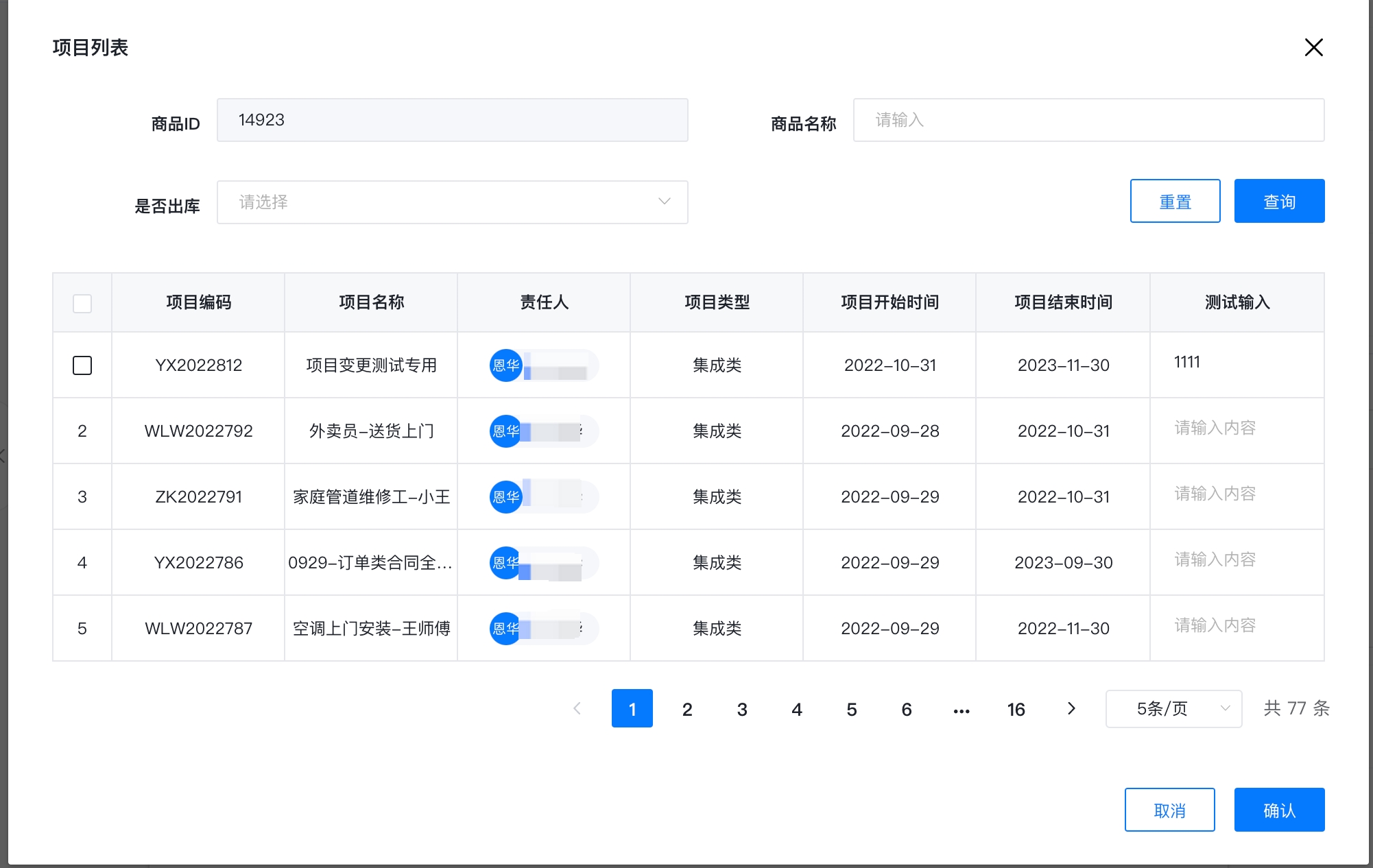
表格的简单编辑
表格的简单编辑依赖于上述的简单插槽,具体配置如下
{
    "type": "FORM_TEXT_INPUT",
    "align": "center",
    "visible": true,
    "editable": false,
    "label": "测试输入",
    "prop": "finput",
    "readOnly": false,
    "required": false,
    "customSlot": "finput1",
    "slotTemplate": "<div class={form-widget form-text-input}> <div class={widget-item}><div class={x-proxy-form-item}><div class={el-form-item}><div class={el-form-item__content}><el-input v-model={row[column.property]} placeholder={请输入内容}></el-input></div></div></div></div></div>"
}
<div class={form-widget form-text-input}>
    <div class={widget-item}>
        <div class={x-proxy-form-item}>
            <div class={el-form-item}>
                <div class={el-form-item__content}>
                    <el-input v-model={row[column.property]} placeholder={请输入内容}></el-input>
                </div>
            </div>
        </div>
    </div>
</div>
效果如下
最后
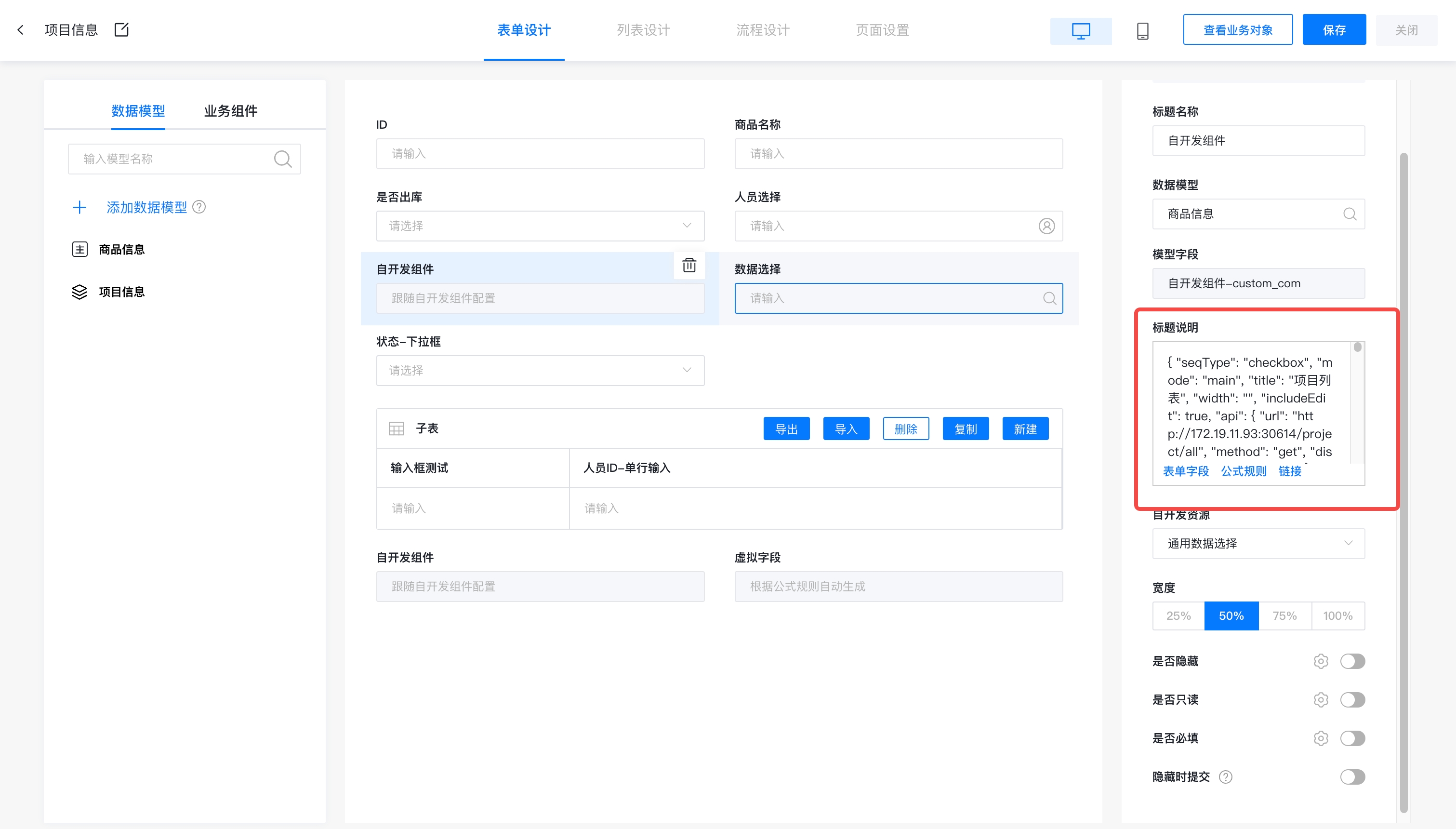
因为是需要将配置写入标题说明中,所以需要将 json 合并行
vscode 合并行: 查看 -> 命令面板 -> 合并行(join line)
配置书写的位置如下图:
todo
带入参数增加其他类型组件,详细见附录
serachList增加更多类型组件,例如:SearchPersonSelect等
允许勾选自定义方法,如何增加配置
插槽模版增加自定义逻辑...